
The basic steps for creating the timing options are shown in the topic Creating a Time Series Protocol.
To add Multi-Positions:
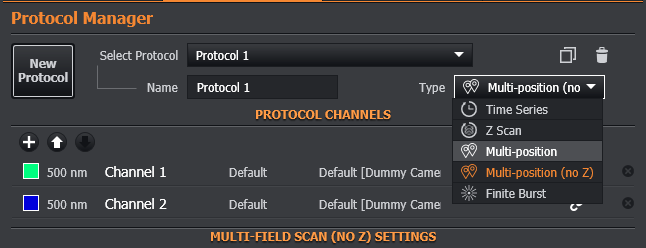
Select the protocol Type as Multi-Position or Multi-Position (no Z). [Multi-Position (no-Z) will define field positions in x and y only.]
The Multi-Positions options appear:
Position (Field)- this is the number of the chosen XYZ position.
X, Y - the coordinates from the XY stage.
Ref. Z - the position (focus) of the microscope for this position. When using the piezo for Z Scans, this will be the centre of the stack. See below for details on defining the Z-stack position when using the microscope as the Z scan device.
Drift Offset - if the microscope is fitted with an autofocus (anti-drift) system, this is the position for this field.
To add a position, navigate with the software or hardware joystick and choose the focus position with the microscope.
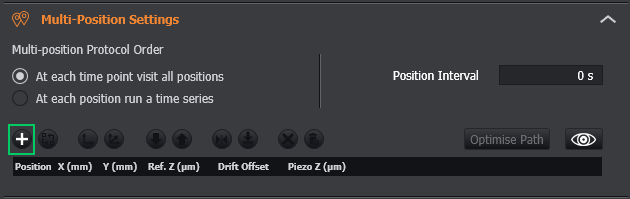
To add extra positions click the + button- a new row is added to the table:
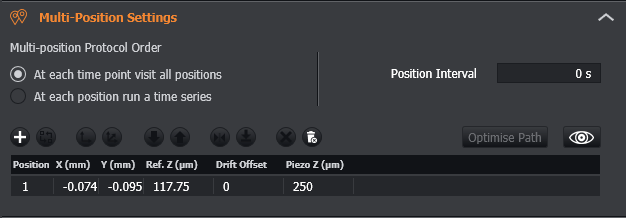
You can enter values in the table, or use the navigation options of the Remote Panel to set the required field positions and use Replace- refer to Replacing Positions (Fields).
Use Ref Z as: This option will become available when using the microscope as the Z-stack device and a Z-stack has been created. It will specify if the Z-stack will start at the focus position of the selected field position, or whether it will be centred.