
Fusion has been designed with ease of use in mind, with functions arranged in panels and information organised to best match the flow of each process. This Fusion Software Guide provides useful supporting information for the extensive range of functions of Fusion, as well as further guidance to help get the best performance from your system.
Using Help within Fusion
There are several levels of help integrated into Fusion:
-
Hovering the mouse pointer over an object provides a helpful Tooltip, or prompt in the form of a text box with a description of that object.
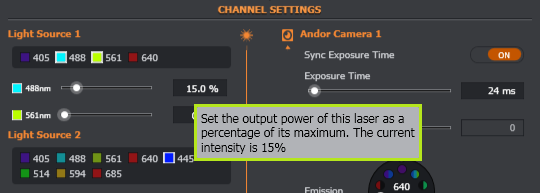
-
Pressing F1 at any time will open the software guide at the relevant section providing further in-depth information for the selected object, area or task.
-
Help content is also available from the help button as a "live" version when you have on-line access so that the latest information is available.

If access to the live version is not possible, help content (as part of the software installation) is still available off-line.
Structure of this Software Guide
This Fusion software guide is organised into a series of sections with the following objectives:
|
Installing the Fusion Software |
Software installation options, hardware requirements and licensing information. |
|
User Interface |
Provides an overview of each of the panels and the functions available within them. |
|
"how to" topics |
Show you how to perform the various imaging tasks within Fusion. The how to topics are grouped as follows:
|
|
Supporting information |
Includes:
|
Links are used throughout to help navigate between related topics in different sections of the software guide. Click on hyperlinks to view a related topic.
Video based help tutorials are also available to help guide you through certain topics and may be viewed by clicking on the links.
Note that this information is based on the default display options and settings. If you have modified settings in the Assign Feature menu, functions may be set to appear on a different panel than the default configuration.