
Drift stabilisation is a microscope-dependent feature.
It is known as "PFS" (Perfect Focus System) on a Nikon and "AFC" (Adaptive Focus Correction) on a Leica microscope.
In general, these devices work by detecting the reflection of an infrared (or near infrared) laser or LED from the coverslip. This enables the microscope to maintain the correct distance between the objective and the coverslip over long (e.g. hours / days) periods of time. The user can set the focus (known as the offset), often using a separate focus wheel, so that the sample stays in focus. Bear in mind however, that if the sample moves away / towards the coverslip, the microscope cannot correct for this. It can only correct for changes between the objective and coverslip.
The screenshot below shows a typical example found in the Global Settings.
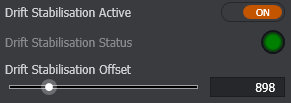
Drift Stabilisation Active - when ON, the microscope will be locked onto the sample, using the distance between the coverslip and objective as its reference. (This assumes that the microscope can see the coverslip reflection and that the objective currently in use is supported for this operation).
Drift Stabilisation Status - shows the microscope's status - Grey = Off, Yellow = Searching, Green = Holding Focus, Red = Failed State. More information about the reason for the failed state can be seen in the tooltip.
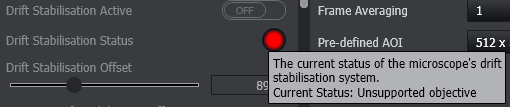
Drift Stabilisation Offset- shows the microscope's internal reference number for the offset - i.e. the difference between the user's chosen focus position and the microscope's knowledge of the coverslip focus position.
It may also be activated in the Protocol Manager Tab to enable the Drift Stabilisation function of the microscope (if available). This also includes a number of options pertaining to multi-field acquisition:
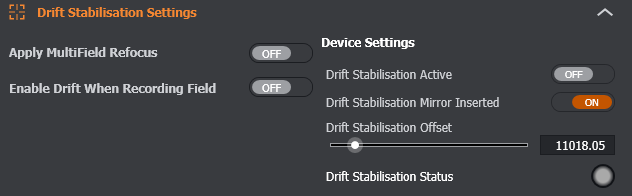
Apply Multifield Refocus - When enabled, drift stabilisation will refocus at each field using the last known hold position recorded for that field. This option has no effect on non multi-field protocol types.
Enable Drift When Recording Field - When enabled drift stabilisation will enable when recording a field position in the multi-field table to ensure a valid offset is stored.
Device Settings
Drift Stabilisation Active - Enable / Disable Drift stabilisation on the microscope.
Drift Stabilisation Mirror Inserted - Toggle the position of the Dichroic mirror on supported devices.
Drift Stabilisation Offset - shows the microscope's internal reference number for the offset - i.e. the difference between the user's chosen focus position and the microscope's knowledge of the coverslip focus position.
Drift Stabilisation Status - The report from the microscope of the current status of the drift stabilisation. e.g. "Ready"; "Searching"; "Out of Range".