
Nvidia Restore Issue
There is currently an Nvidia issue where their drivers do not update properly and they fail to install. To work around this see the following steps:
1. Copy the new drivers and the Display Driver Uninstaller from the link below to the desktop
2. Reboot the PC in safe mode
Do not immediately click restart
a) Click windows -> Power then hold shift and click restart
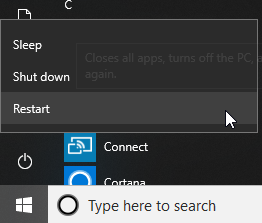
b) The PC will begin a restart but will pause to offer you options. If you do not see these options you will have to start again, the PC is not in safe mode.
c) Click the option Troubleshoot and then Advanced options.
d) Afterwards, go to “Advanced options” and click Start-up Settings.
e) Under “Start-up Settings” click Restart.
f) Press 4 (Enable Safe Mode).
3. After the restart, ‘Safe Mode’ should be displayed above the taskbar. If this is not the case you will need to start again, the PC is not in safe mode.

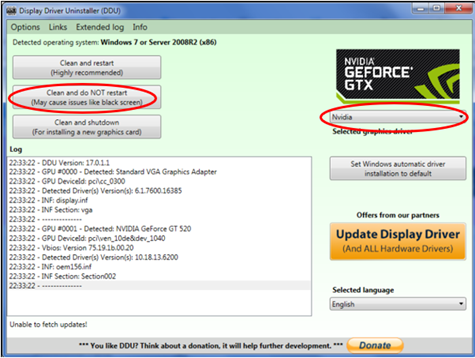
4. Run Display Driver Uninstaller.exe
a) Select GPU and Nvidia from the right hand drop down boxes
b) Select ‘Clean and do NOT restart’
5. Install the drivers – We only need the graphics drivers to install so if the rest fail at the install stage do not worry as long as ‘Graphics Drivers’ status is ‘Installed’
6. Restart the PC normally.