
Application Bar
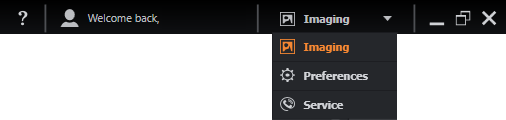
The Application bar (shown below) lets you navigate between the following areas:
Help
Access the Fusion Help. Fusion features an on-line help facility that enables access to the most up to date help content. If you do not have on-line access, help information is still available off-line.
Current User
The current Windows user. Welcome back, User. To change users, close Fusion and log in to Windows as a different user. See the Multi-User section for further details.
Imaging
Access the main imaging functions for your experiments including protocol, image acquisition and analysis controls. For further information please refer to Imaging.
Preferences
View and modify settings for the display, file manager, navigation settings, protocol, rendering and speech options. For further information, please refer to Preferences.
Service
This provides support information and links to the Online Store.